 Standfast
Your runner is up. That doesn’t mean GitHub will send it work.
Standfast is a free menu bar app for Macs that host GitHub Actions runners. It asks launchd whether each runner is alive, asks GitHub whether it still counts on it, and never mixes up the two answers.
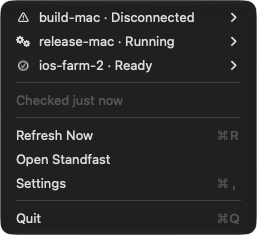
One icon answers for every runner on the Mac
The status item shows one state for every runner on the Mac: a job in progress first, then whatever needs fixing, then the quiet states. Open the menu for one row per runner.
Ready
Registered, connected and waiting for work.Running
Running a job right now. Standfast says which one and for how long.Disconnected
The process is alive, but GitHub cannot see it. No job is coming.Stopped
The service is not running. Start it from the menu or the Standfast window.Could not tell
Standfast names the side it could not read, such as “GitHub not answering”, and says why: no token and nogh, a refused credential, a rate limit, or no answer. Each has a different fix.Starting
You just started it and GitHub has not acknowledged it yet. Held for 30 seconds.No runners
This Mac has no runners at all, which is not the same as failing to read one.
A runner can be running and still useless
A runner whose registration has lapsed keeps its process running. Activity Monitor still shows it and the service script still says it started. The next job simply never arrives, and you find out when someone asks why a build has been queued for an hour.
$ ./svc.sh status
status actions.runner.acme-widget.build-mac:

/Users/ci/Library/LaunchAgents/actions.runner.acme-widget.build-mac.plist

Started:
48213 0 actions.runner.acme-widget.build-mac
- build-macself-hosted, macOS, ARM64Offline
- build-linuxself-hosted, Linux, X64Idle
Standfast asks both on every refresh and keeps the answers apart. That is why a runner that is up but unreachable gets a state of its own instead of being filed under Stopped: the symptom looks the same, and the fix is not.
A glance from the menu, the whole picture in one window

The questions Standfast answers for each runner
Which job, and for how long
Running testflight — 1m 20s, usually 2m 50s
Read from the log the runner already writes, at no extra API cost. “Usually” is the median of the last few successful runs of that same job; with fewer than three, there is no estimate at all.
What is waiting for it
With a token, Standfast lists the repository’s queued jobs and counts the ones whose labels this runner carries, by the same rule GitHub uses to hand them out. For organization and enterprise runners, Standfast says GitHub cannot tell what is queued instead of showing an empty queue.
What it costs your disk
| Tool cache | 4.33 GB |
| Repository checkouts | 431 MB |
| Downloaded actions | 16.6 MB |
| Logs | 9.2 MB |
Measured when you ask, broken down by what each folder is for. Of the runner’s own folders it offers to delete exactly three, only while that runner is ready or stopped. Your checkouts and the job’s temporary folder are never offered.
Whether it is out of date
The installed runner is compared with the latest actions/runner release, checked at launch and then at most once a day. GitHub enforces a minimum version for self-hosted runners, and one that falls below it stops getting jobs.
Whether the Mac stays awake
If you switch on “Keep this Mac awake while a job runs” in Settings, Standfast holds off idle sleep while a job runs and lets go when the work is done. It also warns when the Mac is running hot. It cannot keep a closed laptop awake; macOS offers no public way to promise that.
When something breaks
Notifications you choose, one by one: a job failed, a runner disconnected, a runner stopped on its own. Start, Stop and Restart leave a receipt on the runner’s page saying what actually happened, including that the result is uncertain when a command timed out.
It finds the runners you already have
A runner installed as a service needs nothing typed into Standfast. It reads the LaunchAgent the runner installed and the .runner file the runner keeps beside itself, and asks GitHub about each runner by its own id.
<key>Label</key>
<string>actions.runner.acme-widget.build-mac</string>
<key>WorkingDirectory</key>
<string>/Users/ci/actions-runner</string>
{
  "agentId": 21,
  "agentName": "build-mac",
  "gitHubUrl": "https://github.com/acme/widget",
  "workFolder": "_work"
}
Also watched
- Runners started by hand with
./run.sh, once you add their folder in Settings. Standfast watches them but does not start or stop them. - GitLab runners, from gitlab-runner’s own
config.toml, asked about with a GitLab token you add in Settings. - Ephemeral runner fleets run by a supervisor, from the status snapshot the supervisor publishes.
What you need
- macOS 14 or later, on the Mac that hosts the runners.
- A way to ask GitHub: a token pasted into Settings and kept in your login Keychain, or the GitHub CLI after
gh auth login. Queued work needs the token. - Nothing else. No daemon, no account, no configuration file.

What it never does
- No sudo. A Mac runner is a per-user LaunchAgent, and nothing here needs more than your own account.
- No telemetry. No analytics, no update checks for Standfast itself, and your runner’s logs never leave the Mac.
- No credentials you did not give it. The only tokens it keeps are the ones you paste into Settings, in your login Keychain. Settings says whether one is stored and never shows it.
- No deleting your work. Repository checkouts are never offered for cleanup, and nothing is deleted from a runner while it has a job.
- It does not register runners or edit their labels. It watches the ones you set up.
- It does not support GitHub Enterprise Server. Every GitHub request goes to github.com, so a runner registered on GitHub Enterprise Server reads “GitHub not answering”.
- It does not keep a closed laptop awake. Idle sleep, yes; the lid, no.
- Every file it reads, command it runs and request it makes is listed in the security policy.
Install it with Homebrew
The app is signed with a Developer ID and notarized by Apple, so it opens like any other.
brew install --cask perafan18/tap/standfast
Or download Standfast.zip from the latest release and move the app to Applications. To build it from source instead, with Xcode 16 or later, run git clone https://github.com/Perafan18/standfast.git, then cd standfast and make run.